Why convert MBOX to PDF online?
MBOX is an email storage format used by programs such as Mozilla Thunderbird and Apple Mail. It keeps many email messages together in one mailbox file, and reading them usually takes a program that supports MBOX. A PDF is easier: once converted, you can read your emails in a PDF reader without opening the original email program. When you look for the best MBOX to PDF converter online, check that every email comes out as its own readable document.
MBOX to PDF conversion is useful in several situations:
- Reading emails without an email program: open the converted emails in any PDF reader.
- Sharing email records: send emails as PDF documents, without asking anyone to open an MBOX archive.
- Printing conversations: get email content into a document format that prints easily.
- Keeping records: store important business communication, invoice confirmations and other emails as PDF documents.
- Reaching archived emails: view older MBOX data without setting up the original email account.
How to convert MBOX to PDF online
- Open the online MBOX to PDF converter at the top of this page.
- Click Select MBOX file and pick the file you want to convert, or drop it onto the box.
- Click Convert to PDF.
- Wait while the emails are converted. A counter shows how far it has got.
- Download the result to your computer.
You can repeat this for other MBOX files whenever you need to.
Not sure where the file is? It depends on the program it came from:
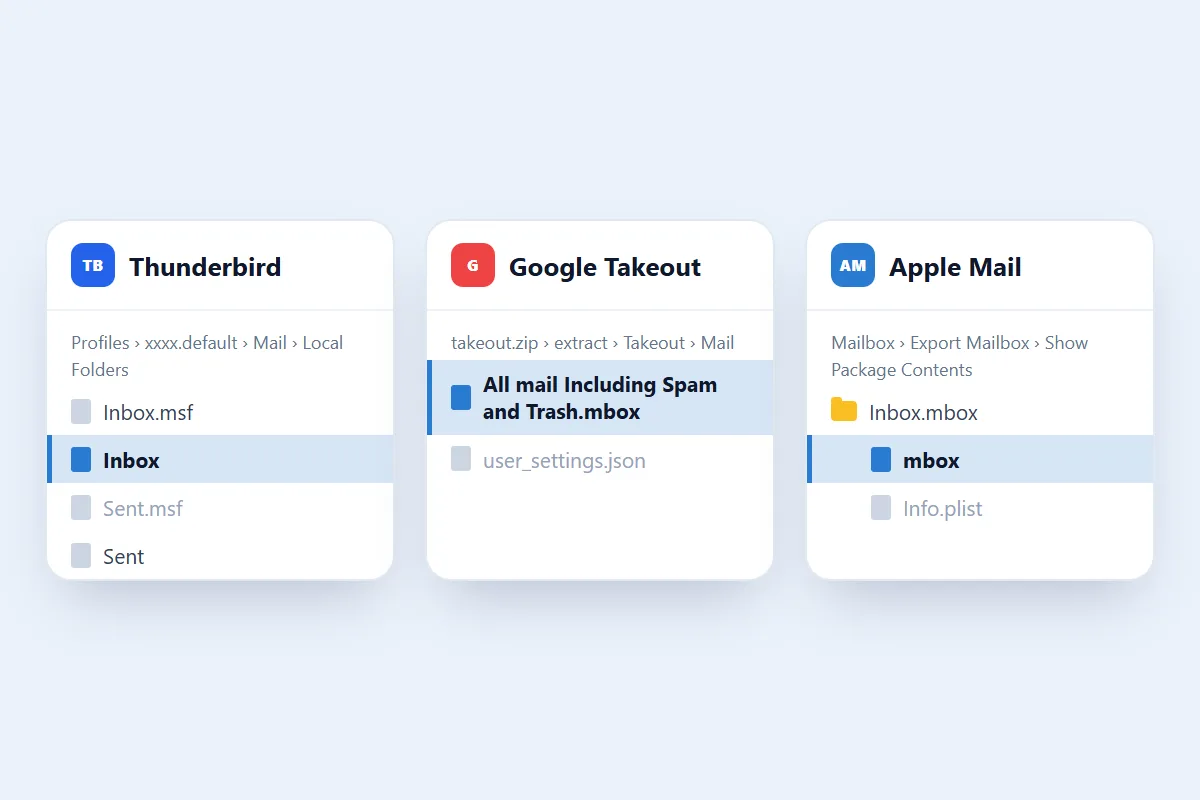
What happens to your emails during MBOX to PDF conversion?
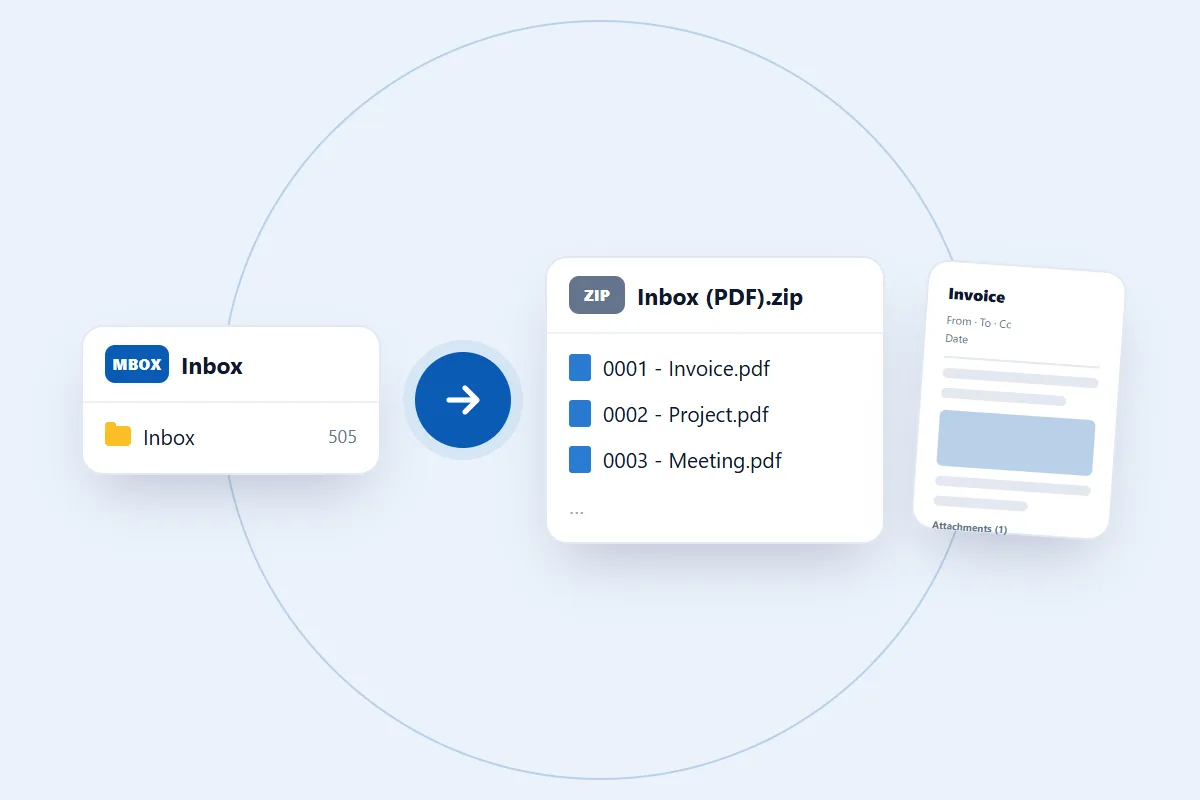
MBOX stores emails in a mailbox, while a PDF presents them as documents. This MBOX to PDF converter online makes one PDF for each email in the file. Each PDF shows:
- Sender and recipients: From, To and Cc.
- Subject and date: the subject line, and the date from the message.
- Email body: the readable text or HTML content of the message.
- Formatting: text styles, lists, tables and links. A layout too complex for a page is kept as clean text.
- Embedded images: pictures that sit inside the email body.
- Attachment list: the name and size of each attachment. The attached files themselves aren't inside the PDF.
An MBOX with many emails comes back as one ZIP file. Each PDF in it is numbered and named after its subject, so the files stay in order. An MBOX with a single email comes back as one PDF.
A PDF is made for reading and sharing. It doesn't work like a mailbox, and you can't import it back into an email program. If you need the emails in Outlook, or need the attached files, use the MBOX to PST converter instead.
MBOX file size and number of files
An MBOX file can be up to 100 MB. If yours is bigger, the converter tells you as soon as you select it. You convert one file at a time, so if you have separate MBOX archives from different email accounts, programs or backup folders, finish one and then select the next. Thunderbird keeps each mail folder in its own file, so a mailbox with several folders means a few rounds.
How long does it take to convert MBOX to PDF online?
It depends on how many emails the file holds and how many images they carry. Building a PDF page takes longer than copying an email, so PDF is one of the slower formats. In our tests an 11 MB Thunderbird folder with 505 emails took about 27 seconds, and a small MBOX with 25 emails took about a second. Keep the page open until the download button appears.
Open and use your converted PDF files
Extract the downloaded ZIP (on Windows, right-click it and choose Extract All), then open any PDF in your usual PDF reader. You can use the documents to:
- Read stored email messages.
- Share email records with other people.
- Print important correspondence.
- Keep email documents for future reference.
- Organize converted records with your other PDF documents.
Keep your original MBOX file too. You'll need it if you ever want to import the mailbox into an email program later.
Are my emails safe with this converter?
Your MBOX file contains personal or business conversations, so privacy matters. The file is used for one thing only: making the PDFs you download. We don't read your emails, share them or use them for anything else.
You don't need to give access to your email account or share your password, and you don't sign in to the account the emails came from. For the details on how files are handled, read our privacy policy.
What we tested
We tested this online MBOX to PDF converter with real MBOX files and checked every PDF that came out.
- An 11 MB Thunderbird mail folder with 505 emails. All 505 came out as PDFs in about 27 seconds.
- A small MBOX with 25 emails, which took about a second, and an MBOX with a single email, which came back as one PDF.
Gmail Takeout and Apple Mail exports use the same standard MBOX layout, but we haven't tested a file from either yet, so if one gives you trouble, tell us.
What makes the best MBOX to PDF converter online?
The right tool for you depends on what you'll do with the documents. Convert a small MBOX first and check these points:
- Email details: each PDF should show the sender, recipients, date and subject from the original message.
- Pictures and layout: open an email that has pictures and tables, and compare it with the original.
- Attachments: find out how they are handled. Ours lists them by name and size but doesn't put the files inside the PDF.
- Size limit: compare the tool's limit with your file. A Gmail Takeout file can be large, and ours takes MBOX files up to 100 MB.
Common problems when you convert MBOX to PDF online
The process is simple, but the source file can affect the result. Here are the common issues.
1. The converter won't take your MBOX file
Check that you selected the MBOX file itself and that it is 100 MB or smaller. If it came from Google Takeout, extract the downloaded ZIP first. From Thunderbird, pick the file with no extension, not the .msf file next to it.
2. The conversion doesn't complete
A damaged MBOX file or unexpected mailbox data can stop the conversion, and so can closing or reloading the tab. Try opening the file in an email program that reads MBOX, to check that its messages are readable. Then try again in an up-to-date Chrome, Edge, Firefox or Safari.
3. Email formatting looks different in the PDF
MBOX messages can contain HTML formatting, inline images and different text layouts, and a PDF has fixed pages. Pictures that were loaded from the internet rather than embedded in the email don't appear. Compare the PDF with the original message if the formatting matters.
4. Some email details are missing
If a sender, date, message body or other detail is missing, check whether it exists in the original MBOX message. Incomplete or damaged source data affects what can be converted.
Still having trouble? Contact us and describe what you see. Please don't send private email content. We never need your mail to help.