Why use an OST to PDF converter online?
An OST file is the offline copy of a mailbox that Microsoft Outlook keeps on a computer. It is tied to one Outlook profile and doesn't open like an ordinary document. When you need saved emails outside Outlook, a PDF is far more convenient. The best OST to PDF converter online for you is one that makes every email readable without the original profile.
Read emails without the original Outlook profile
An OST can stay on a computer after a profile is removed, an account is closed or a system is replaced. The online OST to PDF converter gives you a document copy of those emails to read.
Keep email records in a shareable format
Emails can hold customer discussions, invoices and approvals. PDFs are easy to share with people who don't use Outlook. Use this OST to PDF converter online when you need a readable copy for your records.
Print Outlook emails as documents
When an email has to be reviewed on paper, convert OST to PDF online, open the PDF in a reader and use its print settings.
How to find your OST file
Before you convert OST to PDF online, find the file. On Windows, Outlook stores it in a hidden folder. Open File Explorer, paste this path into the address bar and press Enter:
%LOCALAPPDATA%\Microsoft\Outlook
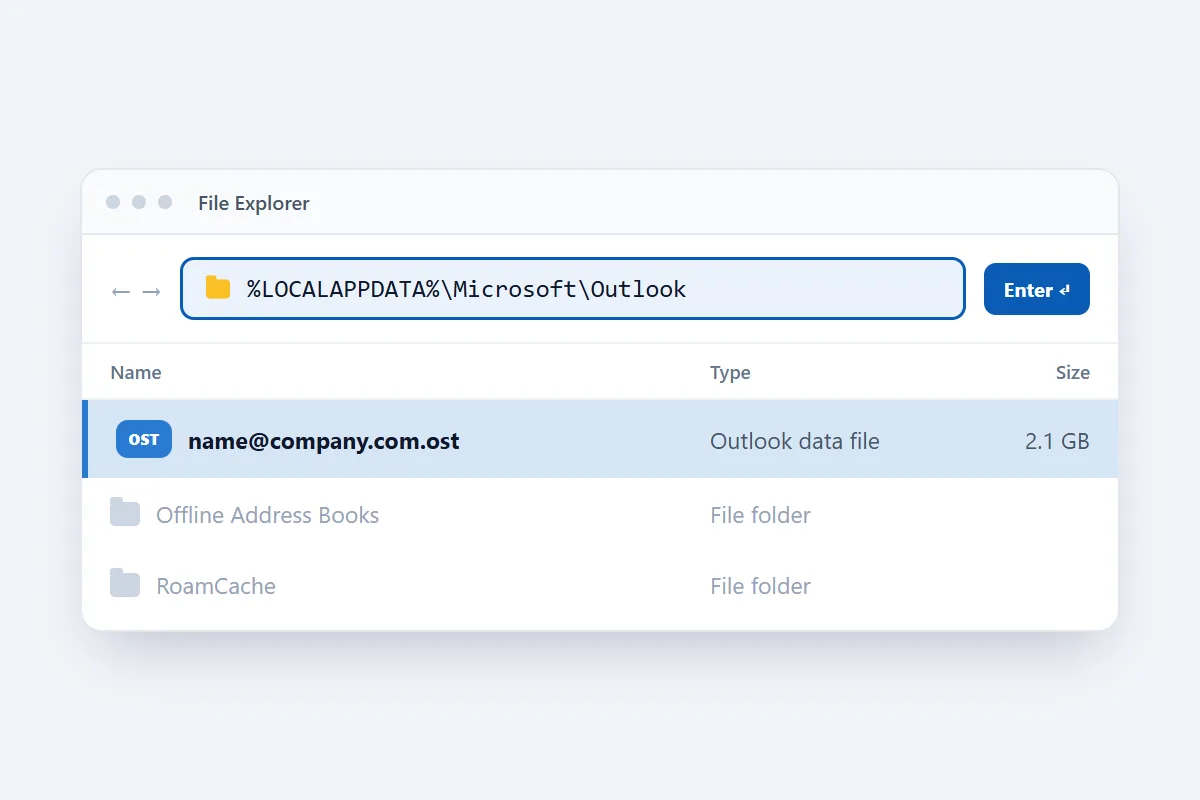
That opens C:\Users\your-name\AppData\Local\Microsoft\Outlook. Look for a file ending in .ost, usually named after the email address. If Outlook still starts, go to File > Account Settings > Account Settings, open the Data Files tab, select the account and click Open File Location. For a file on an old computer, check the same path under that drive's Users folder.
Close Outlook before converting, because it locks its OST while running. Copying the OST somewhere else first keeps the original untouched.
How to convert OST to PDF online
- Click Select OST file at the top of this page and pick your file, or drop it onto the box.
- Click Convert to PDF and wait while the emails are converted. A counter shows how far it has got.
- Download the result, then open a PDF and review it.
What is included in the PDF?
Every email in the OST becomes its own PDF document. Each one shows:
- Sender and recipients: From, To and Cc. Bcc isn't shown.
- Subject: the original subject line.
- Date and time: taken from the message, shown in UTC.
- Message body: the text with its HTML formatting, such as bold text, lists, tables and links. A layout too complex for a page is kept as clean text.
- Inline images: pictures that sit inside the email body.
- Attachment list: the name and size of each attachment. The attached files themselves aren't inside the PDF.
A mailbox with many emails comes back as one ZIP file. Inside, the PDFs sit in the same folders as in Outlook, so Inbox > Clients in the OST becomes the folder Inbox/Clients in the ZIP. Each PDF is numbered and named after its subject.
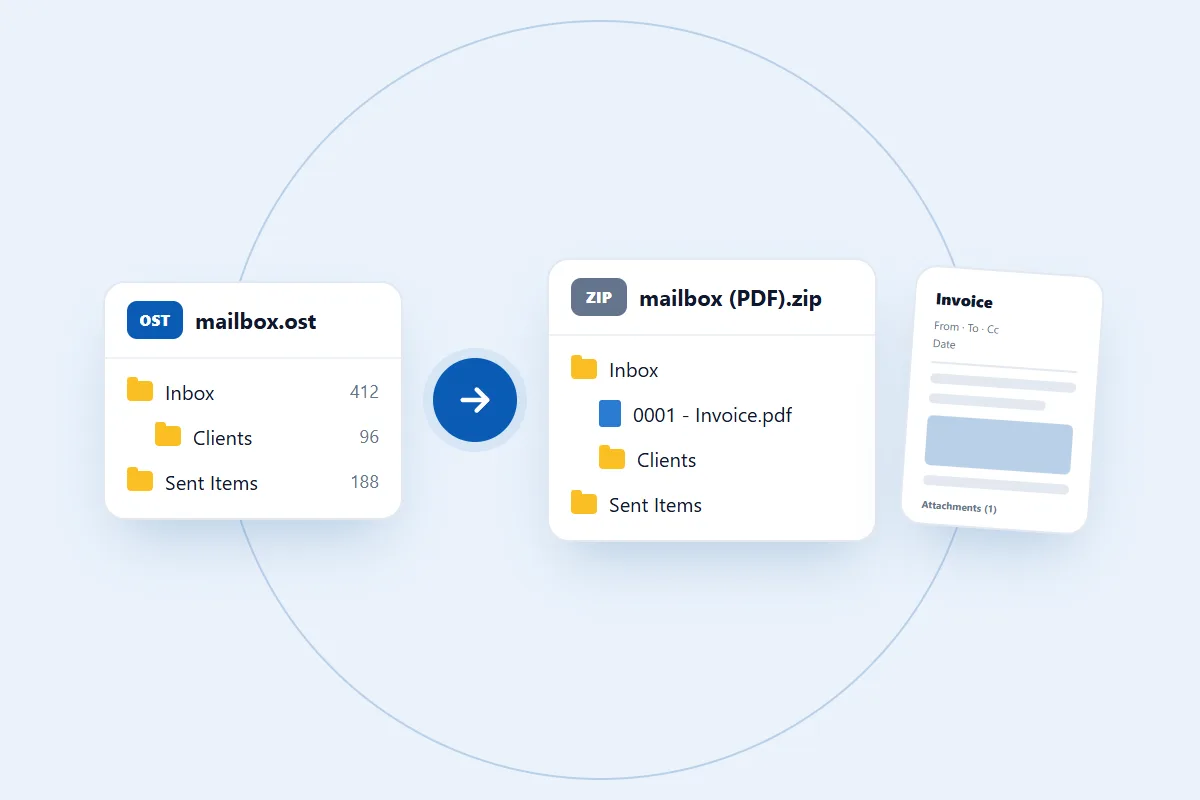
A PDF is a document, so it doesn't work like a mailbox. Read or unread status, rules, signatures and account settings don't carry over, and neither do calendar entries, contacts, tasks and notes. To keep the attached files or open the mail in Outlook, use the OST to PST converter as well.
How long does OST to PDF conversion take?
It depends on how much email the file holds and how many pictures the emails carry. Building a PDF page takes longer than copying an email, so PDF is one of the slower formats. In our tests a 2 MB OST with 29 emails took about three seconds. Use a desktop or laptop for bigger files, and keep the tab open until the download appears.
Is my email safe during OST to PDF conversion?
Your OST holds your email, so privacy matters. The file is used for one thing only: making the PDFs you download. We don't read your emails, share them or use them for anything else. You don't create an account or give us your Outlook password, because the converter works with the saved file and never connects to your mailbox. Read our privacy policy for the details.
What we tested
We tested this online OST to PDF converter with a real OST file and checked every PDF that came out.
- A 2 MB OST with 29 emails in 2 folders. All 29 came out as valid PDFs in the matching folders. We don't yet have an OST with email close to the 100 MB limit to test.
- Bigger mailboxes and emails with attachments went through the same PDF step on our PST to PDF tests, including a 386 MB file well past this page's 100 MB limit.
If an OST within the limit gives you trouble, tell us.
How to choose the best OST to PDF converter online
The right tool depends on what you'll do with the documents. Convert a small OST first and check these points:
- Email content: each PDF should show the sender, recipients, subject, date and message.
- Formatting and images: check how it handles HTML emails and inline images.
- Attachments: find out how they are handled. Ours lists them by name and size.
- File size: check the limit against your OST. Ours takes files up to 100 MB.
- Passwords: a saved OST doesn't need your Outlook password, so be careful with any tool that asks for it.
Common problems when you convert OST to PDF online
1. The OST file isn't accepted
Check that you selected an Outlook .ost file, not a PST or another file type, and that it is 100 MB or smaller.
2. The OST file can't be read
Most of the time Outlook is still running and holding the file, so close it and try again, or copy the OST somewhere else first. A damaged file can also fail, and so can the rare OST created with Outlook's old "high encryption" setting.
3. Some email details aren't visible
A PDF can only show what is in the OST. With Microsoft 365 and Exchange accounts, Outlook often keeps only recent mail in the file, so older emails may never have been in it. Meeting requests and read receipts are left out on purpose.
4. The downloaded file doesn't open
The download may have been interrupted. Download it again and extract the ZIP before opening a PDF. Still stuck? Contact us and describe what you see. Please don't send private email content.